Showing posts with label security tips. Show all posts
Showing posts with label security tips. Show all posts
Today, I am going to show you, how you can win Avast Free ride T-shirts. Just follow the given steps carefully to enter into the game.


3. Click on "Save File" when prompted
- Click on the link given below or copy/paste the link in you browser, I have used Mozilla.
- A window will be opened, as given below, click on Download Avast button.
3. Click on "Save File" when prompted

4 See the downloading has started, you can click on "Show Details" to view details

5. Avast is downloading
 6. Avast has completed downloading
7.Right click on the downloaded avast and click on " open containing folder" from the pop up menu

8. The folder onto which Avast have been downloaded is opened. Now righy click on the downloaded Avast software and click "Run" from the pop up menu.

9. Again click on "Run" If prompted.

10. Avast will open as in the below image, remember to uncheck the checked check boxes as shown below. And then click on Regular Installation.


12. The Avast is installing now

13. Avast has been installed, but it is not over yet, Click on "Done"

14. A small quick scan will be started automatically, let it be. And click on the top " Register" button to enter into the game.

15. Select the Standard protection as shown in the image below

16. Enter your original details, this details will be used to contact you, in case you win. Then click " Register with Email Address".

17. Click on " Stay with basic protection" in the next window.

Now, you have successfully enntered into the game to win amazing T-Shirts.
Share this post to increase your chances of winning.
Winners will be contacted via email address, provided in the registration process.
All the best!
Remember " You have installed Best antivirus" now you are secure too. "
This is the simple method to get the best protection for maximum 3 Years,
Follow these simple Steps:
1.) Uninstall your existing antivirus (if any).
2.) click this link (http://www.avast.com/get/CJPTy7uQ) and download the free version of avast.
3.) Install the downloaded antivirus, during installation select the free version.
4.) After Installation is complete, register the antivirus with your email ID.
5.) Now, you have avast free version for 1 year, don't worry , I know you want the premium avast.
6.) Now move to Recommend option in your antivirus and note the URL.
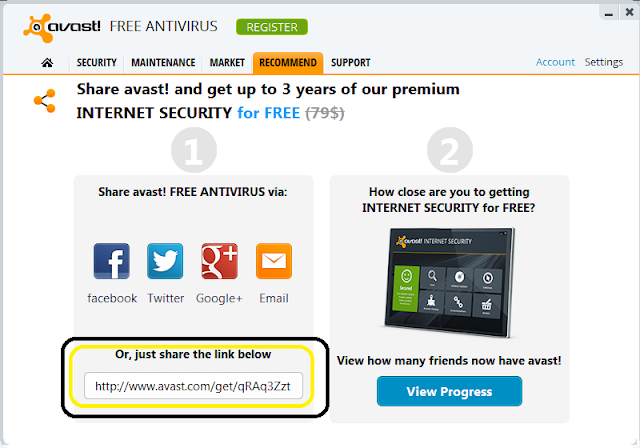
Follow these simple Steps:
1.) Uninstall your existing antivirus (if any).
2.) click this link (http://www.avast.com/get/CJPTy7uQ) and download the free version of avast.
3.) Install the downloaded antivirus, during installation select the free version.
4.) After Installation is complete, register the antivirus with your email ID.
5.) Now, you have avast free version for 1 year, don't worry , I know you want the premium avast.
6.) Now move to Recommend option in your antivirus and note the URL.
7.) Pass this link to forums and onto your friends. After you have 7 friends who have install antivirus from your link, you will be able to download the license file using your avast account.

Sometimes you are unable to boot up your PC because of virus attacks, and at that time the only option left is formatting and re-installing the new copy of windows? YES | or NO.
But don't worry we have one more easy solution for you to clean your system, making tour system 100% virus free.
But don't worry we have one more easy solution for you to clean your system, making tour system 100% virus free.
However many antiviruses claims that the have removed all the security risks from the system, but this is not true. Why?
Because some viruses merge themselves with the system files and run along with them, Antiviruses when system is running are unable to fix these types of risks.
Because some viruses merge themselves with the system files and run along with them, Antiviruses when system is running are unable to fix these types of risks.
But now, you can fix these types of errors using the BOOT TIME SCAN using best Security Software Qucik Heal, and you need to install the trial or full version of the quick heal to use the feature.
You can install trial version from quickheal website
and/ or full version from this link
To create Quick Heal Emergency Bootable Disk you will require to download following package:
Download Emergency Disk Package
For 64-bit Operating System please download following package : Download
Steps:
1. For windows XP/2003 OS.
While creating Emergency Bootable Disk on CD/DVD on Windows XP, Windows 2003 Operating System, you will require to install Microsoft Imaging API Version 2.0 patch. You can download Microsoft Imaging API Version 2.0 patch from below given link.
Download Microsoft Imaging API Version 2.0 patch
For Microsoft Windows Server 2003 32-bit : Download
2. Please download the appropriate package based on your Operating System.
For 64-bit Operating System please download following package : Download
Once the download is completed. Please extract the package in a folder. e.g. c:\my documents\qhemgpkg.
We recommend you not to delete this folder once you have created the Emergency Bootable Disk (CD/DVD/USB disk).
As this folder will be required by you in future while creating latest Emergency Bootable Disk.
Provide the extracted package folder path in Create Emergency Disk wizard and continue with the instructions provided in the wizard.
.
Some screen shots


When you have created the bootable pendrive or CD just boot your sustem from it.
you may need to change your bios bootup settings.
Feel free to comment, if you need any assistance.
Spyware and Adware is software made by publishers that allow them to snoop on your browsing activity, invade your privacy, and flood you with those horrible popups. If you are like most users on the internet, chances are you are probably infected with these applications. That is why we have designed our revolutionary product.
Why does Spyware and Adware affect every internet user?
- All information you enter via the web can be intercepted
- Unauthorized sites can add themselves to your desktop (icons)
- Unauthorized sites can add themselves to your internet favorites
- Your browsing activity can be tracked and monitored
- Unwanted tool bars and search bars can attach themselves to your browser without your knowledge or approval
- Your personal information can be sold to other parties without your knowledge or consent
- Your default homepage and settings can be hijacked so you can't
- change them
- These malicious components not only invade your PC so they can not be removed, but take up your hard drive space and slow down your PC!
- To protect our system and data, we need some good tools which can protect our system. No adware is a nice tool with great technology. This protects your system and data from various type of threats.
System admins are frequently bombarded with security concerns, requests, alerts, news items, “did you see this?!” emails, and more. Keeping up with all the aspects of network security can seem like an overwhelming task, but in this post we’re going to look at ten tools a system admin can use to help secure their network. Some you may be familiar with, like network security software, while others may come as a surprise, like your email client; but all will help you to stay ahead of the bad guys, keep yourself informed of the latest threats, and maintain the security of your network.
1. Network security software
When we talk about network security software, we’re talking about a class of product more than any specific tool, and how important it is for you to have an application or small group of applications that can help you to accomplish most of your tasks. There are simply too many things for any one admin to do by hand, and network security software applications help to automate the heavy lifting and ensure that you can keep up with the workload. Look for network security software that multitasks. Think about it as a Swiss Army knife of software packages that includes many of the other items on this list.
2. Vulnerability scanner
A good vulnerability scanner is a key part of any toolkit, and should be used by server admins and security engineers alike. The top network security software apps will include a scanner that has a database of the thousands of vulnerabilities that could exist on your network, so that you can quickly, easily and regularly scan your network to ensure you systems are up-to-date, configured properly and secured.
3. Port scanner
A port scanner is another regular tool that should be in your network security software application. Attackers regularly scan your Internet connection looking for ways in and so should you. But you should also scan internally so you can find unauthorized services or misconfigured systems, and to validate your internal firewalls are set up correctly.
4. Patching software
Patching operating systems and third party applications is one of the most important, regularly recurring tasks a sys admin has. Network security software that can automate this, and handle the hundreds of other applications on your network, is the only realistic way you can keep up with this.
5. Auditing software
Auditing software may strike you as a strange recommendation at first, but consider all those apps you are trying to patch. How can you be sure you have no vulnerabilities on your systems if your users can install anything on your systems? How are you going to maintain licensing compliance if you don’t know who has installed what from \software? Network security software may also include software and hardware inventory components to help you stay informed and secure.
6. Secure remote clients
Telnet, older versions of PCAnyWhere and several of the web-based remote access apps that are out there all have a common issue - they’re not secure. Use SSH v2 or later for secure access to all CLI-based systems, and the most secure versions of Remote Desktop Protocol to manage Windows boxes. Using strong encryption, good passwords, lockout policies and, when possible, mutual authentication between client and host, will help to ensure no one sniffs credentials or brute-forces their way into a system. If you have two-factor authentication in your environment, ensure that every system possible uses it to further reduce your risk from unauthorized access.
7. A good network analyzer
Whether you like the open source WireShark, the free Microsoft tool NetMon, or one of the many other commercial network analysis tools, having a good “sniffer” is key to helping secure and analyze systems. There is simply no way that’s more effective to figure out just what is going on between networked systems than to see the traffic first hand.
8. Network tools
Whenever you are dealing with connections from foreign systems, you will find the need to check network addresses, routes and more. Having good tools like DIG, WHOIS, HOST, TCPING and others close at hand makes network evaluation a breeze.
9. Log parsing software
Securing systems means going through logs; lots of them. Web logs, access logs, system logs, security logs, SNMP logs, syslog logs – the list goes on and on. Having software that can quickly and easily parse through logs is critical. Everyone has their favorite. Some install locally like LogParser, while others run on servers like Splunk. Whichever you prefer, get a good log parser to help wade through what can be millions of entries quickly and easily so you can find events you need to check.
10. Your email client
Knowledge is power, and the best way to amass that knowledge is to stay informed. Whether you subscribe to email bulletins, security alerts, or RSS feeds, your email client can provide you the first indications that something new is out there, and also what you need to do to protect your systems from the threat. Zero day exploits, out of band patches, best practices and more, can all be yours if you simply join the right distribution lists and subscribe to the right lists.
These 10 system admin tools are a great start towards building your toolkit for security. Network security software plays a major role in this toolkit, which you supplement with other tools and the information you need to maintain a secure environment.
This guest post was provided by Emmanuel Carabott on behalf of GFI Software Ltd. Learn more about the importance of a secure business network by downloading the free eBook: A first aid kit for SysAdmins. All product and company names herein may be trademarks of their respective owners.