Today, I am going to show you, how you can win Avast Free ride T-shirts. Just follow the given steps carefully to enter into the game.


3. Click on "Save File" when prompted
- Click on the link given below or copy/paste the link in you browser, I have used Mozilla.
- A window will be opened, as given below, click on Download Avast button.
3. Click on "Save File" when prompted

4 See the downloading has started, you can click on "Show Details" to view details

5. Avast is downloading
 6. Avast has completed downloading
7.Right click on the downloaded avast and click on " open containing folder" from the pop up menu

8. The folder onto which Avast have been downloaded is opened. Now righy click on the downloaded Avast software and click "Run" from the pop up menu.

9. Again click on "Run" If prompted.

10. Avast will open as in the below image, remember to uncheck the checked check boxes as shown below. And then click on Regular Installation.


12. The Avast is installing now

13. Avast has been installed, but it is not over yet, Click on "Done"

14. A small quick scan will be started automatically, let it be. And click on the top " Register" button to enter into the game.

15. Select the Standard protection as shown in the image below

16. Enter your original details, this details will be used to contact you, in case you win. Then click " Register with Email Address".

17. Click on " Stay with basic protection" in the next window.

Now, you have successfully enntered into the game to win amazing T-Shirts.
Share this post to increase your chances of winning.
Winners will be contacted via email address, provided in the registration process.
All the best!
Remember " You have installed Best antivirus" now you are secure too. "

Cross Site Scripting (XSS) , is one of the most common web application vulnerability that allows an attacker to run his own client side scripts(especially JavaScript) into web pages viewed by other users.
In a typical XSS attack, a hacker inject his malicious JavaScript code in the legitimate website . When a user visit the specially-crafted link , it will execute the malicious JavaScript. A successfully exploited XSS vulnerability will allow attackers to do phishing attacks, steal accounts and even worms.
XSS Attack:
Step 1: Finding Vulnerable Website
Hackers use google dork for finding the vulnerable sites for instance "?search=" or ".php?q=" .
Step 2: Testing the Vulnerability
First of all, we have to find a input field so that we can inject our own script, for example: search box, username,password or any other input fields.

Now we are going to check whether the server sanitize our input or not. In order to do this , let us input the <script> tag inside the input field.


That's good server is sanitizing our input.
Step 3: Exploiting the vulnerability
Now we know the site is somewhat vulnerable to XSS attack. But let us make sure whether the site is completely vulnerable to this attack by injecting a full JavaScript code. For instance, let us input <script>alert('HCB')</script> .


Types of XSS Based on persisting capability:
Based one Persistence capability, we can categorize the XSS attack into two types namely Persistent and Non-Persistent.
Persistent XSS:
The Persistent or Stored XSS attack occurs when the malicious code submitted by attacker is saved by the server in the database, and then permanently it will be run in the normal page.
For Example:
Many websites host a support forum where registered users can ask their doubts by posting message, which are stored in the database. Let us imagine , An attacker post a message containing malicious JavaScript code instead. If the server fail to sanitize the input provided, it results in execution of injected script. The code will be executed whenever a user try to read the post. If suppose the injected code is cookie stealing code, then it will steal cookie of users who read the post. Using the cookie, attacker can take control of your account.
Non-Persistent XSS:
Non-Persistent XSS, also referred as Reflected XSS , is the most common type of XSS found now a days. In this type of attack, the injected code will be send to the server via HTTPrequest. The server embedded the input with the html file and return the file(HTTPResponse) to browser. When the browser executes the HTML file, it also execute the embedded script. This kind of XSS vulnerability frequently occur in search fields.
Example:
Let us consider a project hosting website. To find our favorite project, we will just input the related-word in the search box . When searching is finished, it will display a message like this "search results for your word " . If the server fail to sanitize the input properly, it will results in execution of injected script.
In case of reflected XSS attacks, attacker will send the specially-crafted link to victims and trick them into click the link. When user click the link, the browser will send the injected code to server, the server reflects the attack back to the users' browser. The browser then executes the code .
What can an attacker do with this Vulnerability?
Stealing the Identity and Confidential Data(credit card details).
Bypassing restriction in websites.
Session Hijacking(Stealing session)
Malware Attack
Website Defacement
Denial of Service attacks(Dos)
Reference: breakthesecurity.com
Some times we have passwords but in md5 hash form, but md5 is not easily decryptable , but also not impossible,
2 Ways:
1. search in the databases of many websites just Google for them.
2. use md5 brute attacker download from here. ( pwd to open : hackingcrackingweb )
This is the work by Tim Warriner .
Refrence: http://www.timwarriner.com/software/md5brute.html
2 Ways:
1. search in the databases of many websites just Google for them.
2. use md5 brute attacker download from here. ( pwd to open : hackingcrackingweb )

This is the work by Tim Warriner .
Refrence: http://www.timwarriner.com/software/md5brute.html

Google has local domains for most of the countries in the world. Just few minutes ago some group of hackers hacked into Google's Palestine Domain, however Google has recovered the domain, we still managed to take the screen shot of the defaced page.
"uncle google we say hi from Palestine to remember you that the country in Google map not called Israel. Its called Palestine" The hacker wrote in the defacement.
"#Question : What would happens if we changed the country title of Israel to Palestine in Google Maps..!" The defacement message reads. "It would be revolution. So Listen rihanna and be cool".
If you still wants to see the deface page you can see that using the Google's cache for few hours more.
Search in Google " google.ps/ " as below

To block any website on your windows PC, however there are many ways, but we are going to tell you the simple one.
 It is easy to block a website on a computer using any software or just by changing the DNS server and changing few settings but if you don’t want to use any additional software or service then in this case too, you can block websites on your Windows machine. All you will require for this is :
1. A windows machine
2. A text editor (notepad will do)
3. A web browser
Just follow the steps given below to block a particular website.
1. Go to C:\WINDOWS\system32\drivers\etc
2. Find the file named “HOSTS”
3. Open it using notepad.
-> open it as administrator, how?
a. open cmd as administrator.
b. move to C:\WINDOWS\system32\drivers\etc directory
c. type " notepad hosts "
4. Under “127.0.0.1 localhost” Add 127.0.0.2 www.orkut.com , and that site will no longer be accessible.
5. Done!
E.g.
127.0.0.1 localhost
127.0.0.2 www.orkut.com
- www.orkut.com will not be accessible anymore.
If you want to add more sites then just increment the IP address by one and add it to the list.
i.e.
127.0.0.3 www.yahoo.com (if you want to block yahoo)
127.0.0.4 www.msn.com (if you want to block msn)
127.0.0.5 www.google.com (if you want to block google)
127.0.0.6 www.facebook.com (if you want to block facebook)
127.0.07 www.youtube.com (if you want to block youtube)
You can use this trick to block popup sites as well or any other advertising site.

1. A windows machine
2. A text editor (notepad will do)
3. A web browser
Just follow the steps given below to block a particular website.
1. Go to C:\WINDOWS\system32\drivers\etc
2. Find the file named “HOSTS”
3. Open it using notepad.
-> open it as administrator, how?
a. open cmd as administrator.
b. move to C:\WINDOWS\system32\drivers\etc directory
c. type " notepad hosts "
4. Under “127.0.0.1 localhost” Add 127.0.0.2 www.orkut.com , and that site will no longer be accessible.
5. Done!
E.g.
127.0.0.1 localhost
127.0.0.2 www.orkut.com
- www.orkut.com will not be accessible anymore.
If you want to add more sites then just increment the IP address by one and add it to the list.
i.e.
127.0.0.3 www.yahoo.com (if you want to block yahoo)
127.0.0.4 www.msn.com (if you want to block msn)
127.0.0.5 www.google.com (if you want to block google)
127.0.0.6 www.facebook.com (if you want to block facebook)
127.0.07 www.youtube.com (if you want to block youtube)
You can use this trick to block popup sites as well or any other advertising site.

This package fix all problems
So here is the solution for this:
Steps:
- Download nfsmw1.3patch and crack clicking here. ZIP password is hackingcrackingweb
- Extract the files into a folder using WINrar or any other extracting software.


3.open the folder "nfsmw"

Now here are two folders no dvd crack and patch 1.3
4. first open patch1.3 folder and copy "nfsmwpatch1.3.exe" file and paste it into your nfsmw installation directory
copying

opening nfsmw installation directory which is usually
C:\Program Files (x86)\EA GAMES\Need for Speed Most Wanted (64 bit systems)
C:\Program Files \EA GAMES\Need for Speed Most Wanted (32 bit systems)
or
simply do this to open

5. Paste that copied "nfsmwpatch1.3.exe" in the game installation directory.

Give permissions to copy if required.
6. Now run as administrator "nfsmwpatch1.3.exe"

Now, you have patched your game successfully, if you run your game using original game DVD then you are done now, but no one use original games so one more step in this case.
7. Open that " no dvd crack" folder, and copy speed.exe from that folder, and paste it in the games installation directory as above and replace the already existing file, give required permissions(if prompted).

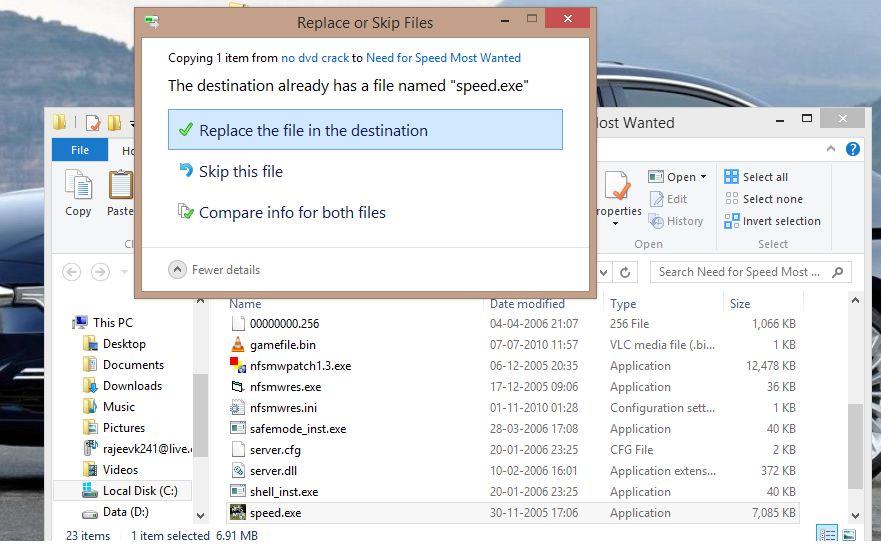
Now you can enjoy nfs most wanted without any disconnection problems, if you face any problem, questions are always welcome
References: http://games.softpedia.com/get/Patch/Need-for-Speed-Most-Wanted-Patch.shtml
 |
| Youtube 18+ |
1. Get the link of your video as below
http://www.youtube.com/watch?v=_UQsnJTZY-A
2. Then copy the Video Id. For above link video Id is _UQsnJTZY-A
3. Now paste the Video Id in the link given below.
http://www.youtube.com/v/VideoId?fs=1
Replace VideoId with the Id you copied in Step 2
4. Now the url will become as shown below.
http://www.youtube.com/v/_UQsnJTZY-A?fs=1
5. Done

In Windows 8, Microsoft quietly removed a useful networking feature: ad-hoc networks.
In Windows 7 (and previous OSes), the tool could turn your PC into a Wi-Fi hot spot, allowing it to share its Ethernet or other Internet connection with other devices by broadcasting its own network.
So, if you paid for Internet access at a cafe, or you're at work, and want to share your PC's Internet with your phone or tablet, this feature would let you do that.
It is very possible to do this in Windows 8, but the built-in method requires fiddling with the command prompt. And for some of us, walking into that black abyss is daunting.
Instead, check out Virtual Router Plus. It's a free, open-source program that does the geek work for you, allowing you to quickly fire up an ad-hoc network whenever you need one.
Once you've downloaded the file, extract it, and launch the VirtualRouterPlus file within that folder. There's no real installation here -- the program will simply launch.
At this point, setup is easy. Enter a name for your network, then choose a secure password with at least eight characters. Finally, choose the connection you want to share (there will most likely only be one choice), and click Start.
To test it out, grab your phone or tablet and connect to your newly created Wi-Fi network. If it doesn't show up, stop the connection on your computer, and hit Start again.
Also remember that your computer needs to stay awake and running to keep its ad-hoc network alive. So, tweak your power settings if need be.
This is the simple method to get the best protection for maximum 3 Years,
Follow these simple Steps:
1.) Uninstall your existing antivirus (if any).
2.) click this link (http://www.avast.com/get/CJPTy7uQ) and download the free version of avast.
3.) Install the downloaded antivirus, during installation select the free version.
4.) After Installation is complete, register the antivirus with your email ID.
5.) Now, you have avast free version for 1 year, don't worry , I know you want the premium avast.
6.) Now move to Recommend option in your antivirus and note the URL.
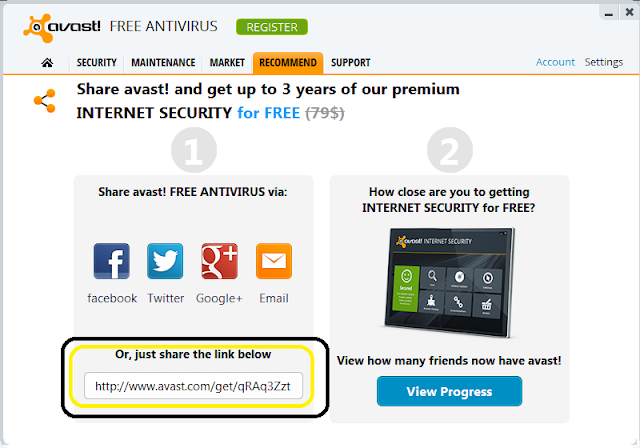
Follow these simple Steps:
1.) Uninstall your existing antivirus (if any).
2.) click this link (http://www.avast.com/get/CJPTy7uQ) and download the free version of avast.
3.) Install the downloaded antivirus, during installation select the free version.
4.) After Installation is complete, register the antivirus with your email ID.
5.) Now, you have avast free version for 1 year, don't worry , I know you want the premium avast.
6.) Now move to Recommend option in your antivirus and note the URL.
7.) Pass this link to forums and onto your friends. After you have 7 friends who have install antivirus from your link, you will be able to download the license file using your avast account.

Sometimes you are unable to boot up your PC because of virus attacks, and at that time the only option left is formatting and re-installing the new copy of windows? YES | or NO.
But don't worry we have one more easy solution for you to clean your system, making tour system 100% virus free.
But don't worry we have one more easy solution for you to clean your system, making tour system 100% virus free.
However many antiviruses claims that the have removed all the security risks from the system, but this is not true. Why?
Because some viruses merge themselves with the system files and run along with them, Antiviruses when system is running are unable to fix these types of risks.
Because some viruses merge themselves with the system files and run along with them, Antiviruses when system is running are unable to fix these types of risks.
But now, you can fix these types of errors using the BOOT TIME SCAN using best Security Software Qucik Heal, and you need to install the trial or full version of the quick heal to use the feature.
You can install trial version from quickheal website
and/ or full version from this link
To create Quick Heal Emergency Bootable Disk you will require to download following package:
Download Emergency Disk Package
For 64-bit Operating System please download following package : Download
Steps:
1. For windows XP/2003 OS.
While creating Emergency Bootable Disk on CD/DVD on Windows XP, Windows 2003 Operating System, you will require to install Microsoft Imaging API Version 2.0 patch. You can download Microsoft Imaging API Version 2.0 patch from below given link.
Download Microsoft Imaging API Version 2.0 patch
For Microsoft Windows Server 2003 32-bit : Download
2. Please download the appropriate package based on your Operating System.
For 64-bit Operating System please download following package : Download
Once the download is completed. Please extract the package in a folder. e.g. c:\my documents\qhemgpkg.
We recommend you not to delete this folder once you have created the Emergency Bootable Disk (CD/DVD/USB disk).
As this folder will be required by you in future while creating latest Emergency Bootable Disk.
Provide the extracted package folder path in Create Emergency Disk wizard and continue with the instructions provided in the wizard.
.
Some screen shots


When you have created the bootable pendrive or CD just boot your sustem from it.
you may need to change your bios bootup settings.
Feel free to comment, if you need any assistance.
Spyware and Adware is software made by publishers that allow them to snoop on your browsing activity, invade your privacy, and flood you with those horrible popups. If you are like most users on the internet, chances are you are probably infected with these applications. That is why we have designed our revolutionary product.
Why does Spyware and Adware affect every internet user?
- All information you enter via the web can be intercepted
- Unauthorized sites can add themselves to your desktop (icons)
- Unauthorized sites can add themselves to your internet favorites
- Your browsing activity can be tracked and monitored
- Unwanted tool bars and search bars can attach themselves to your browser without your knowledge or approval
- Your personal information can be sold to other parties without your knowledge or consent
- Your default homepage and settings can be hijacked so you can't
- change them
- These malicious components not only invade your PC so they can not be removed, but take up your hard drive space and slow down your PC!
- To protect our system and data, we need some good tools which can protect our system. No adware is a nice tool with great technology. This protects your system and data from various type of threats.
System admins are frequently bombarded with security concerns, requests, alerts, news items, “did you see this?!” emails, and more. Keeping up with all the aspects of network security can seem like an overwhelming task, but in this post we’re going to look at ten tools a system admin can use to help secure their network. Some you may be familiar with, like network security software, while others may come as a surprise, like your email client; but all will help you to stay ahead of the bad guys, keep yourself informed of the latest threats, and maintain the security of your network.
1. Network security software
When we talk about network security software, we’re talking about a class of product more than any specific tool, and how important it is for you to have an application or small group of applications that can help you to accomplish most of your tasks. There are simply too many things for any one admin to do by hand, and network security software applications help to automate the heavy lifting and ensure that you can keep up with the workload. Look for network security software that multitasks. Think about it as a Swiss Army knife of software packages that includes many of the other items on this list.
2. Vulnerability scanner
A good vulnerability scanner is a key part of any toolkit, and should be used by server admins and security engineers alike. The top network security software apps will include a scanner that has a database of the thousands of vulnerabilities that could exist on your network, so that you can quickly, easily and regularly scan your network to ensure you systems are up-to-date, configured properly and secured.
3. Port scanner
A port scanner is another regular tool that should be in your network security software application. Attackers regularly scan your Internet connection looking for ways in and so should you. But you should also scan internally so you can find unauthorized services or misconfigured systems, and to validate your internal firewalls are set up correctly.
4. Patching software
Patching operating systems and third party applications is one of the most important, regularly recurring tasks a sys admin has. Network security software that can automate this, and handle the hundreds of other applications on your network, is the only realistic way you can keep up with this.
5. Auditing software
Auditing software may strike you as a strange recommendation at first, but consider all those apps you are trying to patch. How can you be sure you have no vulnerabilities on your systems if your users can install anything on your systems? How are you going to maintain licensing compliance if you don’t know who has installed what from \software? Network security software may also include software and hardware inventory components to help you stay informed and secure.
6. Secure remote clients
Telnet, older versions of PCAnyWhere and several of the web-based remote access apps that are out there all have a common issue - they’re not secure. Use SSH v2 or later for secure access to all CLI-based systems, and the most secure versions of Remote Desktop Protocol to manage Windows boxes. Using strong encryption, good passwords, lockout policies and, when possible, mutual authentication between client and host, will help to ensure no one sniffs credentials or brute-forces their way into a system. If you have two-factor authentication in your environment, ensure that every system possible uses it to further reduce your risk from unauthorized access.
7. A good network analyzer
Whether you like the open source WireShark, the free Microsoft tool NetMon, or one of the many other commercial network analysis tools, having a good “sniffer” is key to helping secure and analyze systems. There is simply no way that’s more effective to figure out just what is going on between networked systems than to see the traffic first hand.
8. Network tools
Whenever you are dealing with connections from foreign systems, you will find the need to check network addresses, routes and more. Having good tools like DIG, WHOIS, HOST, TCPING and others close at hand makes network evaluation a breeze.
9. Log parsing software
Securing systems means going through logs; lots of them. Web logs, access logs, system logs, security logs, SNMP logs, syslog logs – the list goes on and on. Having software that can quickly and easily parse through logs is critical. Everyone has their favorite. Some install locally like LogParser, while others run on servers like Splunk. Whichever you prefer, get a good log parser to help wade through what can be millions of entries quickly and easily so you can find events you need to check.
10. Your email client
Knowledge is power, and the best way to amass that knowledge is to stay informed. Whether you subscribe to email bulletins, security alerts, or RSS feeds, your email client can provide you the first indications that something new is out there, and also what you need to do to protect your systems from the threat. Zero day exploits, out of band patches, best practices and more, can all be yours if you simply join the right distribution lists and subscribe to the right lists.
These 10 system admin tools are a great start towards building your toolkit for security. Network security software plays a major role in this toolkit, which you supplement with other tools and the information you need to maintain a secure environment.
This guest post was provided by Emmanuel Carabott on behalf of GFI Software Ltd. Learn more about the importance of a secure business network by downloading the free eBook: A first aid kit for SysAdmins. All product and company names herein may be trademarks of their respective owners.
Fix Dll Errors Safely and Easy in an Efficient
Way. DllErrorsFix is the best choice for you to fix dll errors in one
step which you can hold complete trust on. Get rid of unwanted dll
errors that cause freezing, crashing or blue screen of death.
Dll Error Free Scan
• Free scan & diagnosis your Dll error.
User Related Errors
• Scan and repair your user related errors.
Dll Error Fix and Repair
Homepage: www.dllerrorsfix.com
Size: 5.18 MB
DLL-Files.com Fixer v2.9.72.2589 Incl Crack
password: hackingcrackingweb.blogspot.com

SpeedConnect Internet Accelerator is exclusively designed for Windows. It is an optimizer to speed up your phone call and LAN / Cable connection. It contains different modes of optimization and supports a variety of network adapters (including AOL). Indeed, when using the attractive visual interface, the software will be easily configured to increase your connection for any supports: internet, e-mail, downloadings, etc.... It is a powerful program and easy to use, which speeds up your Internet connection up to 200 %
DOWNLOAD LINK
LINK
LINK
password is : hackingcrackingweb.blogspot.in

Step 1: Login with the required facebook ID in Mozilla Firefox
Step 2: Go to the pending requests page.
Step 3: Accepting all of the friends with the accept all Facebook friends code.
Press ctrl+shift+k to enter the web development console.
Type/copy the following code into the terminal bar and press enter.
elms=document.getElementById('contentArea').getElementsByTagName('input'); for(var fid in elms){if(typeof elms[fid] === 'object'){elms[fid].click();}}
Step 4 : That’s it!

Steps:
1. Install “Quick Heal Total Security 2012 - 2013 (32bit)“.
2. Download the crack files provided blow
3: Restart your pc
4: keep pressing F8 key again and again till you get menu to go in safe mode
5: After getting in safe mode, copy all the crack files and paste in quick heal directory where quick heal is installed Say yes to replace all files. default directory is => c://program files/quick heal/quick heal total security folder.
6: Run quick heal. Go To Files & Folders Section. Select Exclude Files & Folders. Click on Add button. Add the quick heal folder and sub folders to the exclusion list.
7: Click on Save Changes button.
8: restart pc and run normally
9: enjoy
Download Links
Quick Heal Total Security download from
Link1
Link2
Cracked File
Link1
Note: password for extracting cracked files is "hackingcrackingweb" without quotes.
TYPE THE PASSWORD DO NOT COPY PASTE IT.


Windows 7 Ultimate SP1 x32 & x64 Integrated March 2013
This is the original Microsoft Windows 7 ultimate SP1 ISO from Microsoft. Including Microsoft updates until 17.3.2013 and Internet Explorer 9.
- This release is the best you could find on the net, because Maherz made it just simple:
* NO tweaks or add-ons.
* NO additional programs and software added.
* NO graphics, scripts and wallpapers added or changed.
* It's the original image from Microsoft except added updates and IE9!
- System requirements:
* 1 gigahertz (GHz) or faster 32-bit (x86) or 64-bit (x64) processor.
* 1 gigabyte (GB) RAM.
* 16 GB available hard disk space.
* DirectX 9 graphics device with WDDM 1.0 or higher driver.
Download :
32 bit
64 Bit
By : CyberTech News

Hello to all friends today I am going to post about how can you increase you broadband speed in XP. so guys follow the given below steps to do this ...
1) First u Click on Start Button.
2) Then Select Run From Start Menu.
3) Now Type gpedit.msc
4) Expand the [Administrative Templates] branch.
5) Then Expand the [Network] branch.
6) Highlight(Select by Single Click) [QoS Packet Scheduler]
7) Double-click [Limit Reservable Bandwidth] (Available in Right Side Panel)
8) Check(Select By Single Click on it) [Enabled]
9) Change [Bandwidth limit %] to 0 %
10) Click [OK] Button.
11) Restart Your PC.
12) Now Check Your Broadband Speed.